
CopySafe Video Protection : Copy Protect Video
CopySafe Video provides the most secure video protection on the planet. CopySafe protected videos are safe from all methods of copy, and with DRM applied, they can be protected from sharing and unauthorized distribution.
- 📑 Copy protection and security features
- 📑 Watermark protection
- 📑 Cross platform support
- 📑 Desktop vs. online viewing
- 📑 Outputs for different scenarios
- 📑 Download Copysafe Video software
- 📑 Test drive DRM for CopySafe Video
- 📑 Online demos for evaluation
- 📑 Plugins for CMS websites
- 📑 Tutorial videos
- 📑 Pricing and order link
- 📑 Benefits of using Copysafe Video
- 📑 FAQ
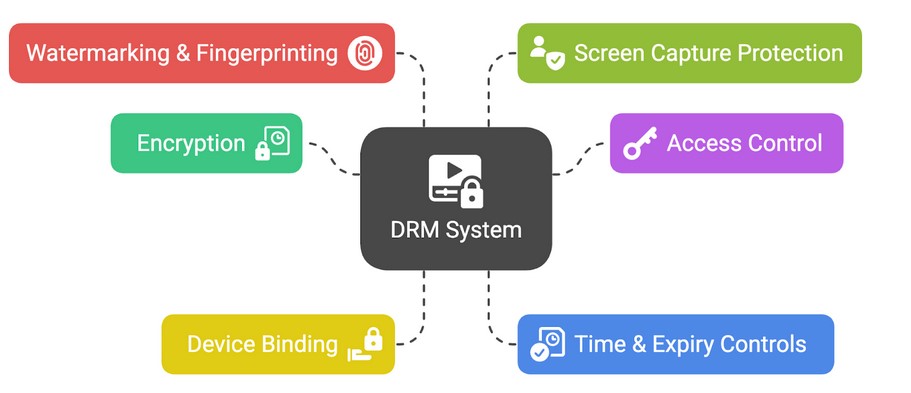
CopySafe Video can be distributed by email, download and on disk for desktop viewing with DRM. Or they can be displayed on web pages for online viewing or local viewing from USB. However desktop reading is the preferred option employed by most authors because our DRM provides total control over all aspects with immediate effect on any changes made, even on video already saved to a user's computer.
Copy Protection & Security Features
- ✅ Encrypt video for desktop viewing or online viewing from web pages.
- ✅ Safe from all copy methods including PrintScreen and screen recording.
- ✅ Limit by number of views or expire by calendar date or hours/days from first use.
- ✅ Watermarking to display a static message or the user's name and IP address.
- ✅ Limit usage to 1-3 computers per subscriber with computer lock.
- ✅ Allow access by group or DRM token (assigned from online sales).
- ✅ Assign multiple groups via group and user settings.
- ✅ Enable tokens for offline DRM - ideal for mariners at sea.
- ✅ Military grade encrytion has negligible impact on file size.
- ✅ Encrypt ASF, AVI, MP4, MKV and WMV up to 1GB and more.
- ✅ Encrypted video with Domain Lock is safe from employees and web hosting staff.
- ✅ Online DRM portal account included for free without limitation.
- ✅ Sell from our online book store for automated purchases/subscriptions.
- ✅ Track sales and usage per document and subscriber.
- ✅ Online Book Cover Design tool integrated with your DRM account.
- ✅ One-time software purchase - free support and upgrades for life.
Watermark Protection
Watermarking doesn't actually prevent copy but it is a most useful deterrent, because and copies can display the identity of the offender. A static watermark can be added at the time of encryption for Copyright notices, or a dynamic watermark can be added for web page display that shows the user's name, IP address, and email if so desired.
Cross Platform Support
CopySafe Video provides copy protection for all scenarios:
Desktop Viewing
For desktop viewing, protected video can be downloaded, attached to emails or distributed on USB for view viewing on the user's desktop. The files can be saved to teh user's computer for viewing at any time, yet are securely protected from all copy, and with DRM applied, they can include access rights controls. These video files are opened and played using the CopySafe Video Player - for Windows computers and tablets.
Online Viewing
For online viewing, from a web page, protected video is encrypted for Domain Lock to prevent the same files from being dsplayed on unauthorized web sites. The web pages displaying Copysafe Video can be opened by the ArtisBrowser - for all OS and devices including Windows, Mac, iOS and Android phones..
Offline Viewing
CopySafe Video can also be displayed on web pages stored and distributed USB or DVD. Being readable in the ArtisBrowser, all OS and platforms are supported including mobile phones.
Desktop Viewing vs. Online Viewing
Some differences to note:
- The comnon belief is that media viewed online doesn't get downloaded and saved to a user's computer - this is untrue, because in all cases of viewing media the file is saved to the user's computer whe However there s slight difference - for desktop viewing the video file gets saved to the user's chosen location. But with online viewing the video file is saved to the web browser's cache folder. However, CopySafe Video files are encrypted and can only be viewed while using either the Copysafe Video Player ot the Artisbrowser, and while opened in those applications, nothing can be saved or copied using any means including screen capture and recording software.
- Videos for desktop viewing will always load faster because there is no delay for a download - they are already on the user's computer.
- DRM can be applied to video for desktop viewing by the CopySafe Video Player, but DRM applied to video for online viewing needs to be applied by the membership/subscription system provided by your website.
Outputs for Different Scenarios
Whether your requirement is for protecting online courses, recipes or corporate data, CopySafe Video offers a variety of outputs:
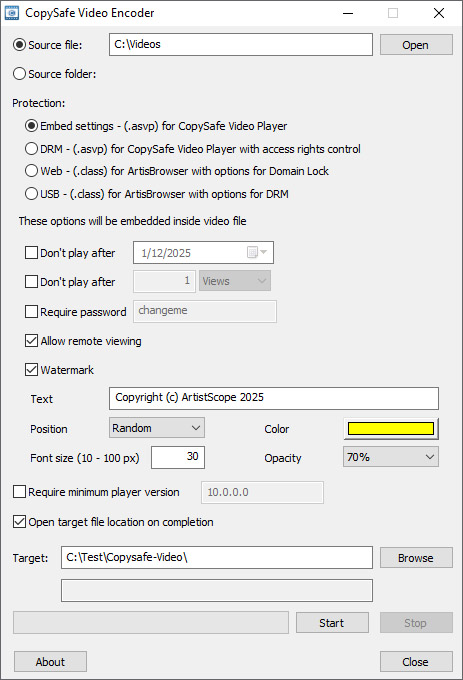
Download CopySafe Video Software
Here you can download the free Video Player and the Video Encoder:
 |
CopySafe Video Encoder | Download | 28.6 Mb |
|
CopySafe Video Player | Download | 22.1 Mb |
The CopySafe Video Encoder can be used for FREE for 14-days.
Test Drive DRM for CopySafe Video
Here you can evaluate our DRM portal for free for 14 days. Click to create a demo DRM account now.
For evaluation of our DRM for video, try downloading and viewing a demo video while using the computer assigned to your demo account. Then try from a different computer. But don't be surprised when you find that the computer without a DRM identity cannot open the video.
Online Demos for Evaluation
To evaluate CopySafe Video displayed by your favorite CMS, select from below - the ArtisBrowser will be required:
CMS Plugins for CopySafe Video
While some authors prefer to distribute protected video for desktop viewing with DRM applied, others display their protected video on their website. For displaying CopySafe Video on web pages, add-ons (plugins) are available for most popular CMS such as WordPress, Drupal, Joomla, and Moodle. These free add-on plugins enable one to upload and display copy protected video on web pages from the online page editor provided by the website's dashboard.:
 |
Drupal Module | Download |  |
More info | ||
 |
Joomla Extension | Download | |
More info | ||
 |
Moodle Plugin | Download | |
More info | ||
 |
WordPress Plugin | Download | |
More info |
CopySafe Video Tutorials
About the CopySafe Video Encoder (video)
How To Copy Protect Live Video Streams (web page)
CopySafe Video Licensing
Unlike other services that charge an annual support fee, charge for software upgrades and charge for anything else they can think of or plagiarize, ArtistScope provides copy protection solutions to protect the livelihood of artists and authors for for life. Included for free in each purchase of CopySafe Video is:
- Free support by email for life.
- Free software upgrades for life.
- Free use of the DRM portal to manage an unlimited number of groups, subscribers and videos.
- Free use of the CopySafe online store to advertise and sell your video. Sales are integrated with your DRM account to add new subscribers from successful purchases. There is no commission payable on sales. All you need is a PayPal account.
- Free use of the online video cover design tool that is integrated with your DRM account and online store.
If that sounds too much like a sales pitch, please consider that ArtistScope pioneered copy protection in 1998 and is still the leading developer for the copy protection of all media displayed on both the desktop and online using a web browser. ArtistScope is the oldest surviving copy protection provider and the only one with integrity and the history to prove it.
Purchase CopySafe Video Software
Each license includes free support and upgrades for life, the DRM Portal service for free without limitation, use of our online book cover design tool and the promotion/sales of video without limitation in our online book store free of commission.
The licensing for the CopySafe Video Encoder software is per computer (the one used to encrypt your video). The order form will automatically calculate the discount for multiple licenses.
The CopySafe Video Player is FREE to redistribute with your videos. The CopySafe Video Encoder is FREE to use for 14 days.
Benefits Of Using CopySafe Video
| Category | Unprotected Video | CopySafe Video |
|---|---|---|
| Accessibility | Open access for all web browsers and search engines. | CopySafe Player or ArtisBrowser only; invisible to bots. |
| Copy Protection | Content is vulnerable to all methods of copy and save. | All methods of copy are prevented. |
| App Requirements | Supports all standard browsers (Chrome, Safari, etc). | Requires ArtisBrowser or CopySafe Player. |
| Tracking Capabilities | Prone to data scraping and packet sniffing. | Total immunity to automated data miners. |
| Web Page Compatibility | Universal compatibility across all devices. | Use ArtisBrowser on Win, Mac, iOS, and Android. |
| Implementation | Easy setup using standard HTML/CSS. | Plugins for WordPress, Drupal, Joomla and Moodle. |
Frequent Questions and Answers
- How does CopySafe Video compare to other secure video solutions?
It is beyond comparison - CopySafe Video provides the most secure protection from all copy, sharing and unauthorized distribution. The encrypted videos cannot be exploited by any means. - Can CopySafe Video be viewed in other media players?
No. The only players that can open CopySafe Video are the CopySafe Video Player and the ArtisBrowser web browser. - Can the CopySafe Video Player be branded?
No. Custom branding can result in loss of reputation, and security can be compromised when updates are not maintained. - Can the CopySafe Video Player be distributed with my videos?
Yes. The CopySafe Video Player is a free download to the public. However we recommend giving your susbscribers the link to download it direct from our web site so that they can always get the latest version. - Can CopySafe Video be distributed as an executable player?
No. We innovated executable players many years ago, only to discover the problems caused by operating system updates and changes. It is best to distribute individual video files that can be read in a Player that can be updated as and when necessary. - Does CopySafe Video increase the file size of the video?
No. Although CopySafe Video uses military grade encryption, the increase in file size is imperceptible. - What type of files can be protected by CopySafe Video?
Most types of video files can be encoded, including ASF, AVI, MP4, MKV and WMV. - Is it necessary to be online to open a DRM protected video?
Yes and no. It depends on whether the video author has approved offline DRM tokens or not. - Can CopySafe Video be displayed on web pages?
Yes. In fact we provide add-ons (plugins) for the popular CMS like WordPress, Moodle, Drupal and Joomla. - Can CopySafe Video be viewed on all devices and OS such as phones?
Yes and no. The standalone video files can be played by the CopySafe Video Player on Windows, but the vid.class files for display on web pages can be played in ArtisBrowser, which is available for Windows, Mac, iOS and Android. - Can CopySafe Video be used to protect a live video stream?
No. Copysafe Video encrypts video files, resulting in a static resource. To copy protect a live stream, we recommend using the ArtistScope Site Protection System (ASPS) or one of its offshoots like Safeguard Media.


