
CopySafe Web Protection : Website Protection Software
The best advice for your scenario?
 CopySafe Web
Protection provides the most secure image protection imaginable. CopySafe Web
encrypted images cannot be saved, downloaded, copied or captured. Nor can the
encrypted images stored on the server be used anywhere else except for display on the owner's web pages. By simply adding a small encrypted to any web page,
copy protection is activated for the whole page, protecting all media from PrintScreen and screen capture.
CopySafe Web
Protection provides the most secure image protection imaginable. CopySafe Web
encrypted images cannot be saved, downloaded, copied or captured. Nor can the
encrypted images stored on the server be used anywhere else except for display on the owner's web pages. By simply adding a small encrypted to any web page,
copy protection is activated for the whole page, protecting all media from PrintScreen and screen capture.
First released in 1999 CopySafe Web provided the most secure copy protection for web pages until the release of the ArtistScope Site Protection Software (ASPS) in 2014 which creates a secure tunnel between web server and the user's browser to protect all data and media from all avenues of copy, even from browser cache and memory. However ASPS requires a dedicated/virtual server while CopySafe Web can be used on any web page and hosted anywhere.
How CopySafe Web Protection Works
A CopySafe Web encrypted image placed on a web page will activate the CopySafe Web browser plugin which interacts at system level to control the user's clipboard and memory associated with copy functions. When the user leaves the page their copy functions are restored. Unlike the many copy protection knock-offs that rely on blacklist of screen capture software which are easily thwarted by simply renaming their EXE file, CopySafe solutions interact with the clipboard and memory associated with copy to provide more robust and fool proof copy protection.
To copy protect any web page all you need to do is add a small CopySafe Web image anywhere on the page. The CopySafe Web Converter (seen below) will import images and batches of image for encryption, saving them all to one web page or separate pages for upload to your web site. That HTML code can be copy-n-pasted to where you want the image to appear. Or you can use one of the CMS plugins (see below) and uploaded your encrypted images and add them to your pages from the CMS page editor.
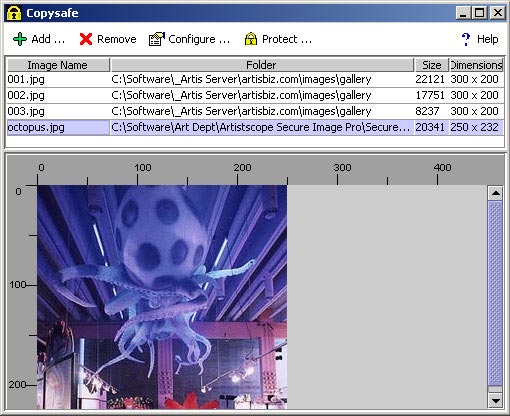
The CopySafe Web Converter can be run from the sever to automate uploads. The Converter is a Java application and should run on any computer or server. To interface the Converter with your upload pages a server DLL is available for Windows servers which is DLL is free to licensed users.
Real Copy Protection
The CopySafe solution is unique and incomparable to other copy protection solutions. However since 2015 all of the popular web browsers dropped support for real browser plugins in favor of "surface" apps for mobile phones that are useless for actioning anything at system level. But what has been a disaster for "copy protection" has been a blessing for site owners that do need real copy protection, because now they cannot make the mistake of allowing access to the popular web browsers that by design to be popular, provide every means to exploit privacy and web site protection.
Now web page protection can be very much more secure when site visitors use the ArtisBrowser. Unlike all other web browsers, ArtisBrowser was designed specifically to protect data and copy protect of web page media. ArtisBrowser includes all of the functionality of normal web browsers but switches to "protected mode" when it detects ASPS or CopySafe media.
CopySafe Web Protection Features
Any web page can be copy protected by adding a small CopySafe Web encrypted image.
- Prevent PrintScreen and screen capture or all text, images and media on the web page.
- Encrypted images cannot be saved and displayed anywhere else.
- Encrypted images cannot be retrieved from browser cache or memory.
- Encrypted images stored on the server are even safe from the webmaster himself.
- Supported across all Windows OS since Windows XP.
- One-time domain lock license purchase - free support and upgrades for life.
Who benefits the most by using CopySafe Web Protection?
Anyone who has intellectual property or a livelihood to protect, including document to image storage services, because CopySafe Web encrypted images not only provide the best copy protection for images while displayed on web pages but they are also protected while stored on the web server, safe from everyone including your web developer and hosting staff. Copy protection for images cannot be more secure than with CopySafe Web.
Download the ArtisBrowser
The ArtisBrowser includes the browser plugins for all CopySafe solutions:
 |
ArtisBrowser for Windows 7 to Windows 10 | Download Now | ||
|
|
ArtisBrowser for Windows XP and Vista | Download Now |
CopySafe Web Protection Tutorial Videos
CopySafe Web Protection Online Demos
After installing the ArtisBrowser you can explore these online demos:
 |
Non-CMS demo - demo page on this site using static HTML |
 |
Drupal CMS - web site showcasing ASPS and all CopySafe solutions |
 |
Joomla CMS - web site showcasing ASPS and all CopySafe solutions |
 |
Moodle CMS - web site showcasing ASPS and all CopySafe solutions |
 |
WordPress CMS - web site showcasing ASPS and all CopySafe solutions |
CMS Add-ons for CopySafe Web Protection
These free add-ons will enable you to add CopySafe Web encrypted images from the CMS editor:
 |
DNN Module | Download | ||
|
|
Drupal Module | Download | ||
|
|
Joomla Extension | Download | ||
|
|
Moodle Plugin | Download | ||
|
|
WordPress Plugin | Download |
Purchase CopySafe Web Protection Software
Each license includes free support and upgrades for life. The licensing for CopySafe Web Protector software is per domain to enable domain lock. The order form will automatically calculate the discount for multiple licenses.
Frequent Questions and Answers
- How does CopySafe Web compare to other image protect solutions?
Most other image protect solutions rely on JavaScript which is insecure as it actions on the client browser after the image has already been downloaded. Otherwise no other comparable solution is possible except ASPS since 2015 due to web browser changes leaving ArtisBrowser as the only web browser that can support real copy protection. - Can we use the normal web browsers?
No. All popular web browsers released after late 2015 (except the ArtisBrowser) no longer support real plugins, that is, plugins that can interact at system level which is where copy protection needs to be actioned. Now modern browsers only support simple add-ons based on HTML and JavaScript that are supported by mobile phones and other amusement devices. - What happens if the CopySafe plugin or ArtistScope browser is not installed?
Your protected pages will check the user's browser and if necessary redirect them to download and install before allowing access. - Can CopySafe Web images be distributed on disk?
Yes. To distribute images and other media such as video and Flash on CD or USB, we recommend using the ArtistScope Portable Media solution. - Does CopySafe Web increase the file size of the image?
No. Although the image is encrypted to the nth level and cannot be decrypted by any application except the CopySafe Web browser DLL, the file size of the original image does not increase. - Can CopySafe Web pages be searched from the Internet?
Absolutely not. The content of a CopySafe Web page is protected and only accessible to users using the ArtisBrowser with the CopySafe Web DLL installed. Search engines cannot use the ArtisBrowser. - Is CopySafe Web licensing a one-time fee or are there other costs?
Licensing for the CopySafe Web software is a one-time fee that includes free support and upgrades for life. - What type of files can be protected by CopySafe Web?
Any type of file that can displayed on a web page can be protected from PrintScreen and screen capture. However the solution is designed for encrypting images and the file types that can be encrypted include all GIF, JPG and PNG images of good quality. - How does CopySafe Web protect web pages?
To protect any page from PrintScreen and screen capture, simply add a small CopySafe Web encrypted image to the page. As the image loads it actions the CopySafe browser DLL and if no plugin support is found the user is redirected for download and install. - Can web pages be protected form download, save and data mining?
Yes. But only when the ArtisBrowser is used. - Can I use CopySafe Web in an intranet or corporate network?
Yes. The CopySafe Web software can be purchased and licensed for "localhost" or any other web name or IP address that your intranet site uses. - Can CopySafe Web be used in CMS like Drupal and WordPress?
Yes and we do provide modules for all the popular CMS such as Drupal, Joomla, Moodle and WordPress. - Do CopySafe Web images take longer to download?
No. However it may appear that they do because normal images start displaying before they are completely downloaded, whereas encrypted image must download first before decryption can take place. Also, normal images are usually cached so subsequent visits to the same page or pages using the same image do not need to be downloaded again. - Can CopySafe Web images be viewed on all devices and OS such as phones?
No. Windows is required. However Mac can either run Windows 10 by using Bootcamp or install the ArtisBrowser by running Windows in a Parallels partition. - Are there plans to extend CopySafe Web support to other OS?
Not possible. All non-Windows OS are useless for real copy protection because they cannot action at system level and therefore cannot effectively prevent copy or screen capture. Authors publishing their intellectual property for such devices do so at great risk .


