
CopySafe PDF : PDF Copy Protection Software
The best advice for your scenario?
 Specially
designed to copy protect PDF documents and eBooks, CopySafe PDF
Protection provides incomparable copy protection with the most
robust DRM to prevent sharing and unauthorized distribution.
Specially
designed to copy protect PDF documents and eBooks, CopySafe PDF
Protection provides incomparable copy protection with the most
robust DRM to prevent sharing and unauthorized distribution.
Distribute CopySafe PDF files for desktop reading by email, download and on disk using DRM that enables total control over all aspects with immediate effect on any changes made, even on PDF already downloaded and saved to a user's computer or still out in the wild on disk. Or display on web pages using one of our CMS plugins for DNN, Drupal, Joomla, Moodle or WordPress.
While CopySafe PDF requires a Windows computer (Mac can run Windows via Parallels) it does provide the most robust and most secure PDF protection which is why it is the PDF security software chosen by professionals where livelihoods and data security matter. Unlike most other PDF protect solutions, CopySafe DRM and password protection cannot be removed! CopySafe PDF software provides 3 different output types:
- Copy protect PDF for desktop reading with password and/or expiry date.
- Copy protect PDF with DRM to prevent sharing and unauthorized distribution.
- Copy protect PDF on your web pages using domain lock.
CopySafe PDF : Copy Protection Features
Your PDF documents can be copy protected for easy distribution with optional DRM to prevent sharing and unauthorized distribution.
- Encrypt PDF for desktop reading with optional DRM or for online web page display.
- Prevent all copy including PrintScreen and screen capture.
- Prevent sharing with password protection or DRM.
- Prevent printing or limit the number of prints.
- Limit number of views to a number of visits.
- Expire by calendar date or expire by days/hours from first use.
- Limit usage to 1-3 computers per subscriber with computer lock.
- Enable access by group or individual token.
- Multi-language support (including right-left).
- Online DRM portal account included for free without limitation.
- Sell from our online book store for automated purchases/subscriptions.
- Track sales and usage per document and subscriber.
- Online Book Cover Design tool integrated with your DRM account.
- One-time software purchase - free support and upgrades for life.
CopySafe PDF : Security
CopySafe PDF protection uses military strength encryption to prevent data extraction, ensuring that your document's contents will only be available to who you expressly allow. Password requirements and expiration can be set on documents for general distribution, or if more specific access control is needed, DRM can be enabled to ensure that only those users with your specific permissions can open the document.
When DRM is applied user access is validated by the user's unique computer signature which cannot be shared on other computers. In other words, even if a user sends a copy of your protected PDF to 1,000 friends, none of them will be able to open the PDF unless they also have your explicit permissions. Those permissions are managed from your DRM portal and they can be varied or suspended at any time with immediate effect over any changes made, even to PDF already downloaded and saved to a user's computer or still out in the wild on disk.
CopySafe PDF : Benefits
Almost anyone who needs data protection that cannot be exploited in any way. Sure, it may be conceivable to use weak protection on ebooks that are sold cheaply, but expensive online courses, corporate data and other intellectual property that may be mission critical, needs to be properly protected to protect the livelihood of their owners and authors. Copy protection for PDF and ebooks cannot be more secure than with CopySafe PDF.
Password Protection vs DRM
While password protection is considered to be DRM, it does not prevent users from sharing their password with a copy of the file. There are many solutions offering password protection but most do not prevent extraction of the password from the document as a search for the means to hack PDF passwords will show. But real DRM, like what is used by CopySafe software, cannot be exploited in nay way and it cannot be shared because each subscriber is identified by their unique computer ID which cannot be faked or duplicated.
CopySafe PDF Protector Software
The CopySafe PDF Protector desktop GUI is easy to use. Simply nominate distribution type, for example for desktop viewing with or without DRM, or for online viewing from your web site, and the GUI will walk you through the steps as you nominate your desired copy protection and print control settings and project folder.
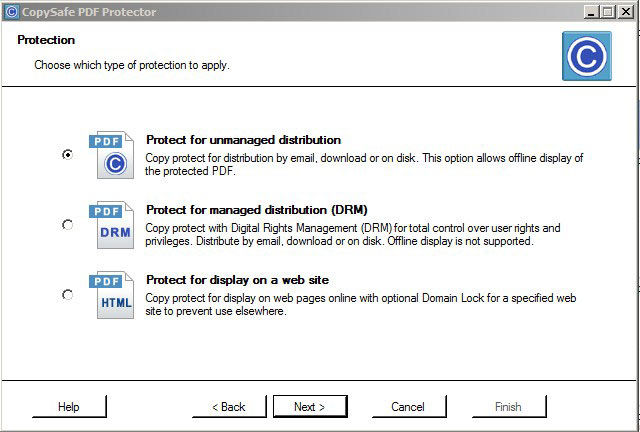
Unmanaged distribution means copy protected but without DRM, while the DRM option can prevent unauthorized distribution and sharing by locking the PDF to the user's computer. For display on web site means that the PDF will be encrypted and domain locked to your web site, and thus cannot be opened or displayed anywhere else.
Download Trial Software
Here you can download the free CopySafe PDF Reader and a trial version of the CopySafe PDF Protector:
 |
CopySafe PDF Protector | Download |
|
|
CopySafe PDF Reader * | Download |
|
|
* ArtisBrowser (includes CopySafe plugins) | Download |
The CopySafe PDF Reader is free software and can be distributed with your protected PDF files. The CopySafe PDF Protector software is also free to use but until it is licensed, protected PDF will be limited by a watermark.
CopySafe PDF DRM Trial
Here you can evaluate our DRM portal for free for 14 days.
The CopySafe PDF DRM portal will enable you to upload and convert a variety of document types for evaluation of our DRM and copy protection. Although the demo doesn't include all features such as group, subscriber and token management or usage tracking, you can still experiment with the different protection settings and send test documents to friends to see how effective our DRM and the prevention of sharing really is. The CopySafe PDF DRM portal can be managed from any device that can access the Internet, enabling you to upload documents and manage sales and subscriptions from any computer or mobile device. Click to create your Demo DRM account now.
CopySafe PDF Online Demos
While most authors prefer to distribute protected PDF for desktop viewing with DRM applied, some do insist on keeping their users on their web site by displaying their protected PDF on their web pages. For that purpose we provide add-ons for most popular CMS such as DNN, Drupal, Joomla, Moodle, and WordPress that greatly simplify the task.
CopySafe PDF Reader
The image below shows what the CopySafe PDF Reader plugin looks like on a web page. Its look and functionality is almost identical to the desktop version of the reader, except that it runs from a web page from a web browser. When displayed on a be page you have the option of preventing printing or allowing print.
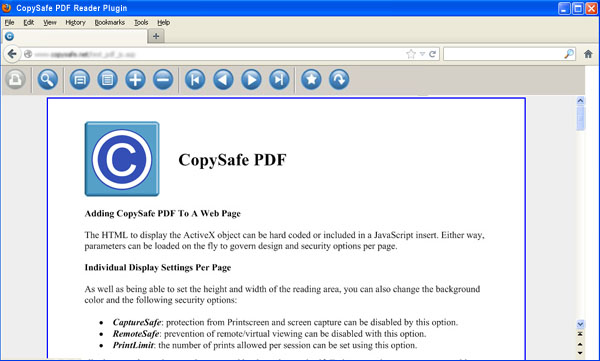
With the desktop version of the CopySafe PDF Reader, when DRM is applied, you have more options at your disposal such as limiting the number of prints by count.
CMS Add-ons for Web Page Reading
These free add-ons will enable you to upload and display copy protected PDF on your web pages from your online page editor:
 |
DNN Module | Download |  |
More info | ||
 |
Drupal Module | Download | |
More info | ||
 |
Joomla Extension | Download | |
More info | ||
 |
Moodle Plugin | Download | |
More info | ||
 |
WordPress Plugin | Download | |
More info |
CopySafe PDF Tutorials
CopySafe PDF Licensing
Unlike other services that charge an annual support fee, charge for software upgrades and charge for anything else they can think of or plagiarize, ArtistScope provides copy protection solutions to protect the livelihood of artists and authors for for life. Included for free in each purchase of CopySafe PDF is:
- Free support by email for life.
- Free software upgrades for life.
- Free use of the DRM portal to manage an unlimited number of groups, subscribers and documents.
- Free use of the CopySafe online store to advertise and sell your PDF and ebooks. Sales are integrated with your DRM account to add new subscribers from successful purchases. There is no commission payable on sales. All you need is a PayPal account.
- Free use of the online book cover design tool that is integrated with your DRM account and online store.
If that sounds too much like a sales pitch, please consider that ArtistScope pioneered copy protection in 1998 and is still the leading developer for the copy protection of all media displayed on both the desktop and online using a web browser. ArtistScope is the oldest surviving copy protection provider and the only one with integrity and the history to prove it.
Purchase CopySafe PDF
Each license includes free support and upgrades for life, the DRM Portal service for free without limitation, use of our online book cover design tool and the promotion/sales of ebooks without limitation in our online book store free of commission.
The licensing for the CopySafe PDF Protector software is per computer (the one used to encrypt your PDF). The order form will automatically calculate the discount for multiple licenses. Although licensing is required, the software is not required to upload and distribute PDF from your DRM account.
Note: That the CopySafe PDF Reader is free to redistribute to your users without any limitations. It is only the encryption software (the CopySafe PDF Protector) that needs to be licensed. Both the Protector and the Reader are supported on all 32-bit and 64-bit computers from Windows XP to Windows 10.
An Alternative To Purchasing Is Renting
While purchasing a software license provides all options and features, if you only need the DRM service, it can be rented per month or by hits to your documents. Mind you, most ebook authors only use the DRM service because our DRM prevents all sharing and unauthorized use. From your DRM account you can upload PDF for conversion by the server side converter... no software is needed. Also, it can be managed from any computer or device, including mobile phones.
For a complete price list, see DRM Service Rental
The rented service also includes use of our online book cover design tool and the option to sell your ebooks from our online book store (commission free) with successful sales automatically adding new subscribers to your DRM Portal for management, newsletters, statistics, etc.
Frequent Questions and Answers
- How does CopySafe PDF compare to other secure document solutions?
Other solutions are not secure at all while CopySafe PDF provides the most secure protection from all copy, prevention of sharing and unauthorized distribution, and cannot be extracted or decompiled in any way.
- Can CopySafe PDF be opened by Adobe PDF Reader and others?
No. Adobe and other PDF readers are designed to be generic and as such are not secure. The only reader that can open CopySafe PDF is the CopySafe PDF Reader which is why it remains as the most secure document solution on the planet.
- Can the CopySafe PDF Reader be branded?
Absolutely not. Fake protection readers offer branding but the CopySafe PDF Reader does much more and at system level. So reputation and code-signing is most important for Windows and security applications to allow the Reader to do its job.
- Can the CopySafe PDF Reader be distributed with my documents?
Yes. The CopySafe PDF Reader is a free download to the public. However we recommend giving your subscribers the link to download it direct from our web site so that they will always get the latest version.
- Can CopySafe PDF documents be distributed in an executable Reader?
No. Distributing executable documents is something that we innovated only to learn soon after that it posed problems as later versions were released that caused conflicts and errors. It is always best to distribute individual documents that can be read in the CopySafe PDF Reader which can be updated as and when necessary.
- Does CopySafe PDF increase the file size of the document?
No. Although the document is encrypted to the nth level and cannot be decrypted by any application except the CopySafe PDF Reader, the file size of the original document does not increase.
- Can CopySafe PDF documents be searched from the Internet?
Absolutely not. The content of a CopySafe PDF document is protected and only accessible to authorized users while using the CopySafe PDF Reader which can be used to search while the document is open.
- Is CopySafe PDF licensing a one-time fee or are there other costs?
Licensing for the CopySafe PDF Protector software is a one-time fee that includes use of the online DRM portal, the online book cover design tool and the online book store for free for life.
- What type of files can be protected by CopySafe PDF?
Any type of files that can be converted to PDF. However PDF with embedded video and music is not supported. In fact a good rule of thumb is export/save the PDF for Adobe Reader version 8.0 or earlier as later effects and tricks are dependent on JavaScript and CSS that may only be supported in the latest versions of Adobe Reader.
- Are hyperlinks and bookmarks supported?
Yes. Bookmarks within the same document are supported and hyperlinks to resources on the Internet are also supported. But bookmarks linking between separate CopySafe PDF documents are not supported.
- Is it necessary to be online to open a DRM protected document?
Yes. Your subscribers and document permissions are managed from your online DRM portal, so to gain approval to open a DRM protected document the subscriber must be online at the time.
- Can I use CopySafe PDF with DRM in an intranet or corporate network?
Yes. The CopySafe PDF DRM software can be purchased and installed on your Windows server making your DRM service completely in-house and independent.
- Can CopySafe PDF be displayed on web pages?
Yes and we do provide modules for all the popular CMS like Drupal, WordPress, etc. However since late 2015 all popular web browsers have dropped support for real plugins, leaving only the ArtistScope web browser to support plugins that can action at system level. The plugins now supported by popular browsers can only be based on JavaScript and CSS and are thus limited to simple apps.
- Publishing for desktop reading vs web page viewing?
While web page display of protected PDF may seem like a good idea, it is not as secure as desktop reading and can be limited because only the ArtistScope browser can be used. Most online courses use the desktop publishing option with DRM applied because not only is it very much more secure by preventing sharing, authors can distribute by email, download and on disk while maintaining TOTAL CONTROL over all aspects with immediate effect on any changes made, even on documents still out in the wild or already saved to a subscriber's computer.
- Can CopySafe PDF be read on all devices and OS such as phones?
No. Windows is required. However Mac can install the CopySafe PDF Reader by running Windows in a Parallels partition or by using Bootcamp.
- Are there plans to extend CopySafe PDF support to other OS?
Not possible. All non-Windows OS are useless for real copy protection because they cannot prevent copy at system level and cannot reliably identify the user's machine to properly enforce DRM. Authors publishing their intellectual property for such devices do so at their own peril.


